MagicChat in Claude
Ask Claude what your customers asked this week, see which questions your support bot can't answer, and fix them in one reply.
 MagicChat · recent_questions, search_knowledge
 What you can ask
- “What did customers ask my support bot this week, and which ones can't it answer yet?”
- “Write a refund policy FAQ with me and add it to my MagicChat bot”
- “Train my MagicChat bot on https://yourwebsite.com/faq”
- “How many conversations and leads did my bot get this month?”
Claude can list your bots, train them on a page or on text it writes with you, check what they know, read what visitors asked, and show stats and leads. Nothing can be deleted through the connection.
Connect MagicChat to Claude
- 1
Have a MagicChat account
- 2
Press this button, then Continue
It opens Claude with MagicChat already filled in. Just press Continue (1):
Add MagicChat to Claude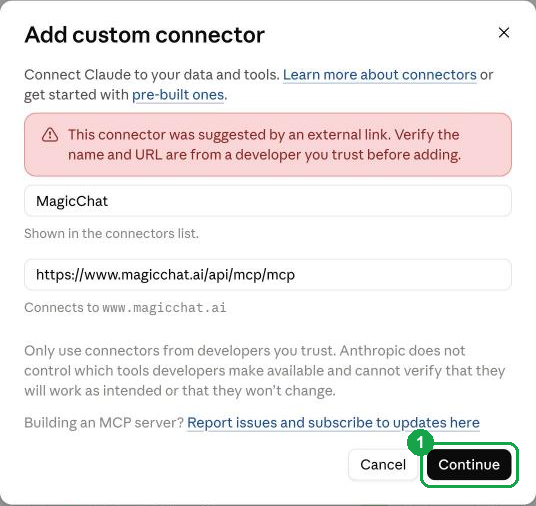
Claude shows a red note that the connector came from a link. That's normal for any app added this way.
The button didn't fill it in? Do it by hand
In Claude, open Settings → Connectors, press + Add, then Add custom connector. Paste these two and press Continue:
NameMagicChatMCP server URLhttps://www.magicchat.ai/api/mcp/mcp - 3
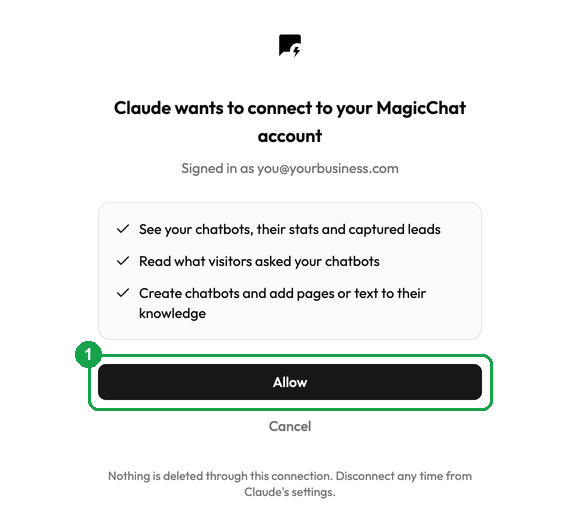
Press Allow
Claude opens a MagicChat page. Sign in if it asks, then press Allow (1). You're back in Claude, connected. The first time you ask, Claude asks your permission to use MagicChat; allow it.
If something doesn't work
- Claude doesn't use MagicChat: start your message with “Use MagicChat to…”, and check MagicChat is switched on in the chat's tools menu.
- Claude won't let you add a connector: some plans limit custom connectors, and on Team or Enterprise an owner may need to allow it.
- “No bots yet”: ask Claude to create one, or make it on the MagicChat dashboard.
- Disconnect: Claude Settings → Connectors → MagicChat. Questions? Support.